
Search Console Platform Properties: How Malaysian Brands Can Now Track TikTok and Instagram in Google Search

Key takeaways
- Google Search Console platform properties let you verify an Instagram, TikTok, X or YouTube account as its own Search Console property and see the clicks, impressions, CTR, average position and search queries that content earns in Google Search, Discover and Google News. Google announced the feature on 7 July 2026 and made it available globally on 29 July 2026. Setup is free, takes a few minutes per account, and each handle must be verified separately. Data starts appearing a few days after setup. This is a reporting change, not a ranking lever, and it closes what I'd call the discovery-to-search handoff: the point where someone who first found you on social leaves the app and types you, or your category, into Google.
In this article
1. The gap this closes
For years I’ve had the same conversation with hotel and F&B clients in KL. The marketing team shows me TikTok saves and Instagram reach. The GM shows me bookings. Somewhere between those two numbers is a step nobody could measure: the person who watched a reel about a Bangsar cafe, didn’t tap the link, and searched the cafe’s name on Google two days later.
Search Console never saw that content. It only reported on domains you controlled. So a TikTok video ranking in a Google short-video carousel for “kedai makan sedap PJ” was invisible in every report you sent your client.
That changed this month. This guide covers what a platform property actually is, what data you get, how to set one up, which comparisons are worth running for a Malaysian or Malaysia-plus-Singapore content calendar, and what the feature deliberately does not do.
2. What is a Search Console platform property?
Quick Answer: A platform property is a Search Console property type for a social or video account rather than a website. You verify your Instagram, TikTok, X or YouTube account, and Search Console reports how that content performs in Google Search, Discover and Google News. It’s the first property type you can verify without owning a domain.
Here’s the mechanism, because it matters more than the feature list.
A Search Console property has always been an identity claim. You proved you controlled a domain, and Google then attributed everything it had indexed under that domain to you. Platform properties keep the model and change the proof. Instead of a DNS record or an HTML file, ownership is established through the platform account itself. Google already indexes instagram.com/reel/... and tiktok.com/@handle/video/... URLs; the verification step simply tells Google which of those indexed URLs belong to you.
That has a practical consequence people miss. According to Search Console Help, ownership is re-checked periodically, and if the external login expires your property pauses until you re-verify. The reassuring part is that re-verifying restores the same reports without waiting for data to accumulate again. Treat the login like any other client credential you’re responsible for.
Four platforms are supported at launch: Instagram, TikTok, X and YouTube.
Key takeaway: If your brand’s discovery happens on social but your conversion happens on Google, this is the first Google-owned dataset that shows you both sides.
3. What data do you actually get?
Quick Answer: Three reports. Insights gives you a visual 28-day overview with top content, top queries, audience countries and query group themes. Performance gives you clicks, impressions, CTR and average position with filters for country, device, date, query and specific post. Achievements tracks click milestones. Google News and Discover tabs only appear if that surface actually sends you traffic.
| Report | What it shows | When I actually open it |
|---|---|---|
| Insights | 28-day traffic trend, top-performing posts, the queries people used, audience countries, query group themes | Monthly client reporting and content planning |
| Performance | Clicks, impressions, CTR, average position, filterable by country, device, date, query and page | Anything diagnostic, plus all exports |
| Achievements | Click-based growth milestones | Rarely. Nice for internal morale, not for decisions |
Table 1: The three reports available on a platform property. Source: Google Search Console Help, “About platform properties in Search Console”, and Google Search Central, “Analyze your social and video platform content performance in Search Console”. Both retrieved 29 July 2026.
Two things in the data are worth knowing before you interpret anything.
Instagram stories that surface in Google results count as impressions, and a tap counts as a click. For video, a click still registers even when it opens inside the Google viewer rather than sending the user to the platform. So a click here means “chose your result”, not “landed on your profile”.
The Insights summary card at the top counts clicks across web, image, video and news search. The detailed lists underneath focus on web search results. The lists will therefore add up to less than the headline number, and that’s expected behaviour, not a bug. I’ve already seen one agency report treat the difference as data loss.
The 24-hour filter is the part I’d use first
Search Console’s default window is 28 days. For a website that’s sensible. For a TikTok post it’s useless, because the entire visibility lifecycle of a post in a Google short-video carousel can start and finish inside that window, and a 28-day average flattens it into nothing.
The 24-hour filter, sitting above the Performance chart, is what makes the report operationally interesting. Google’s own guide uses a get-ready-with-me video as the example: you post yesterday, and by looking at 24-hour data you can see a specific search term suddenly pulling people to it, then act while the surge is live. Cross-post it. Reference the same trend in a story. Push the search interest toward your other profiles.
That’s a same-day decision that no monthly social report has ever been able to trigger.
Query groups tell you what your captions are missing
The Insights report includes a query groups card that clusters search terms into themes and flags which are trending up and which are trending down. For a Malaysian account this is the most underrated screen in the whole product, and I’ll explain why in section 6.
Key takeaway: Insights for the story you tell the client, Performance plus the 24-hour filter for the decisions you make this week.
4. How to set up a platform property, step by step
Quick Answer: Open Search Console, click Add property, choose your platform from the list, and authorise through that platform’s login. Repeat for every account and every platform. Expect a few days before data appears, and expect partial charts until a full window accumulates.
Before you start, get proper access. Each account needs a working login or admin-level access at the point of verification, which means for client work you need the marketing team in the room or a shared password manager entry. Budget fifteen minutes for the first property and about three minutes each after that.
Step 1: Open the property selector. Go to the Search Console welcome screen, or use the property selector dropdown in the sidebar and click Add property.
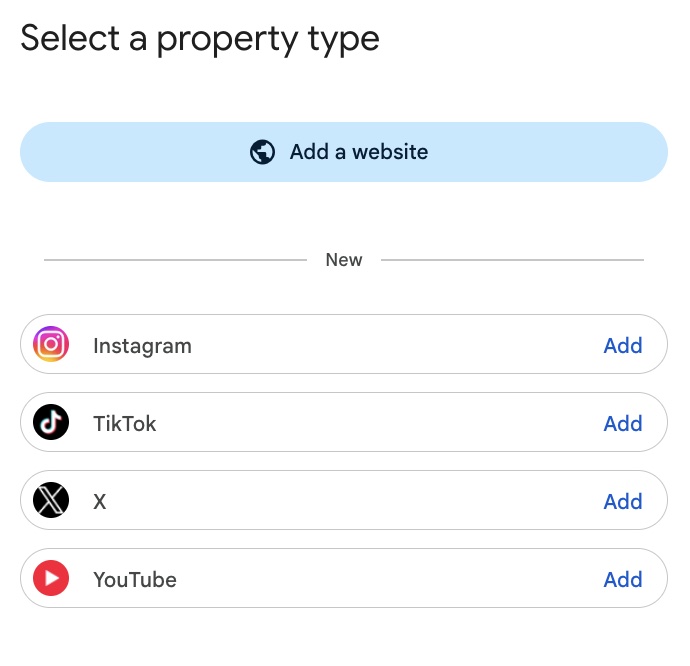
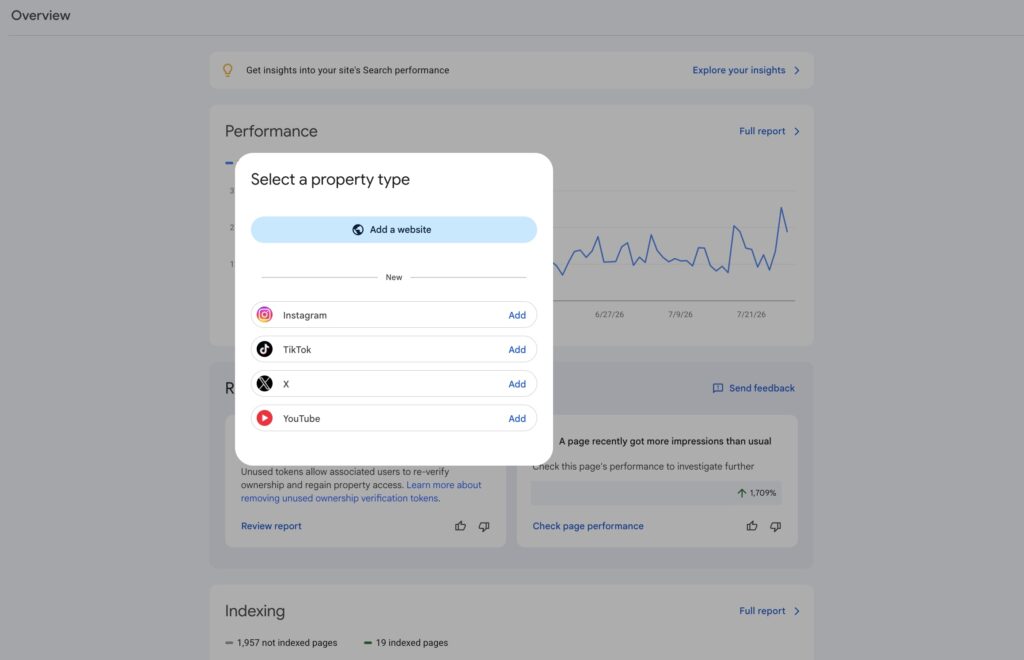
Step 2: Pick the platform. The screen is headed “Select a property type”. Your existing option, “Add a website”, sits at the top. Below it is a divider marked New, and under that the four platform rows: Instagram, TikTok, X and YouTube, each with its own Add link on the right. Click Add on the one you want and follow the prompts. Done means you see a confirmation message and a Go to property button.
Step 3: Repeat for every handle. This is the step teams get wrong. One property covers one account on one platform. A hotel group running a corporate Instagram, a property-level Instagram, a TikTok and a YouTube channel needs four properties. Multiple profiles on the same platform also need one each.
Step 4: Check whether they’re already there. If you’ve already claimed your Search profile, all of your verified accounts are automatically added as properties. Open Search Console and check the property list before you start adding anything manually. I’ve watched two people create duplicates that were already sitting in the dropdown.
Step 5: Wait, then set a baseline. It takes a few days for metrics to collect and process after setup. New properties show empty or partial charts until then. Don’t report on week one. Let it run, then use the first full 28-day window as the baseline everything after gets measured against.
Common mistake: treating a paused property as a data gap. If the platform login expires, reporting stops until someone re-verifies. Put a recurring check in whoever owns the account’s calendar.
Want the baseline done for you? Send us the four handles you care about. We’ll set up and verify the properties, then send back a 14-day read showing which posts are pulling Google traffic and which search terms are doing it. No charge, no deck, just the numbers.
5. The comparisons worth running
Quick Answer: Three are worth your time. Compare formats against each other using URL filters, compare the same content across platforms by exporting each property separately, and compare countries if you run one calendar across Malaysia and Singapore. Search Console has no combined cross-platform view, so the third one is manual.
Format comparison is the easiest win. Use comparison mode to build two URL groups and put them head to head:
| Platform | Compare this | Against this | What it answers |
|---|---|---|---|
| YouTube | URLs containing /watch | URLs containing /shorts/ | Is long-form or short-form earning your Google visibility? |
URLs containing /p/ | URLs containing /reels/ | Are static posts or reels doing the search work? | |
| YouTube | A page filter containing playlist | — | Which playlist pages rank, and how their names and descriptions differ |
Table 2: URL filters for format comparison inside a platform property. Source: Google Search Central, “Analyze your social and video platform content performance in Search Console”, retrieved 29 July 2026. Note that playlist filters report on the playlist page itself, not the videos inside it.
Cross-platform comparison has no shortcut. Google’s own guide walks you through it as an export job: open the property, click the URL you want, click Export, choose your format, repeat for every other property, then join the files. Tedious, but this is where the useful finding usually lives. Google’s example is the one I’d expect for a Malaysian F&B account: a long cooking tutorial doing well on YouTube while the shortened TikTok version gets no search traction. Same idea, different search demand, and the fix is repackaging rather than posting more.
The country filter is the one Malaysian agencies should reach for immediately. Plenty of KL-based teams run one content calendar across Malaysia and Singapore because the client sees a single market. The Performance report will tell you, per post, whether that’s true. My guess is you’ll find hospitality content pulls a heavier Singapore share than anyone budgeted for, and that food content splits hard along local-vernacular lines. Check it rather than assuming it.
Key takeaway: Format comparison takes five minutes and usually changes the content calendar. Cross-platform export takes an hour and usually changes the strategy.
6. What this means for Malaysian brands specifically
Quick Answer: Malaysian discovery is social-first and Malaysian conversion is search-first, so the handoff between them has always been the least measured step in the funnel. Hotels, F&B and retail are the three categories where the gap is widest, and platform properties are the first free Google dataset that shows what happens in between.
| Sector | Where discovery happens | What the query data should reveal |
|---|---|---|
| Hotels and resorts (Langkawi, Penang, KK) | Reels and TikTok of the room, the pool, the view | Whether property-name searches follow the reel, and which non-branded terms your video actually ranks for |
| F&B (PJ, Bangsar, JB) | TikTok food reviews, IG stories | Which dish or location terms drive search, in which language, and whether the Google carousel is doing work your ads aren’t credited for |
| Retail and malls | Product and haul content | Whether posts pull category searches or only branded ones, and what the country split looks like |
Table 3: Where the discovery-to-search handoff is widest by sector. Note: illustrative sector framing based on Malaysian campaign patterns, not a measured dataset. The metrics named are the fields Search Console reports; the sector expectations are ours to test, not Google’s claims.
Here’s the specific thing I’d check first on any Malaysian account, and it’s the query groups card.
Malaysian search is a mix of English, Bahasa Melayu and Chinese, often inside a single household. Most brand content calendars I inherit are written in English because that’s what the agency writes in. The query groups card will show you, in themes rather than a wall of individual terms, which language your Google visibility is actually coming from. If a TikTok captioned entirely in English is being found through BM queries, that’s not a translation problem, that’s a captioning and hashtag opportunity you can act on this week.
Query groups give you a demand signal, not a keyword list, and the two get confused constantly. A theme trending up tells you people are searching in that language about that topic. It doesn’t tell you which exact phrasing to put in the caption, whether the BM term has real volume behind it or just happened to find you once, or whether the English and BM versions of the same intent are actually competing for the same result. Running bilingual keyword research for BM and English queries against what the card surfaces is what turns the signal into a caption you can write.
The pattern I’d expect on a PJ or Bangsar F&B account: the English terms skew branded, and the BM terms skew category. Someone searching your restaurant name found you already. Someone searching “kedai makan halal berdekatan” has not, and if that’s the theme trending up, your captions are earning discovery your keyword research never planned for. Match the caption to the language of the demand rather than the language of the brand deck.
The second thing: the 24-hour filter is disproportionately useful in a market this size. Malaysian food and travel trends move fast and local. Seeing a term spike within a day, while a post is still live in the feed, is the difference between riding it and writing a case study about it later.
Key takeaway: The report is the same everywhere. The finding that’s specific to Malaysia is usually a language one.
7. What platform properties do not do
I’d rather set this expectation now than field the disappointed email later.
This is reporting, not a ranking lever. Verifying a property does not make your content rank better in Google. Nothing you do inside Search Console changes how your TikTok performs in search results. What changes is that you can finally see it.
It does not show in-platform performance. Google is explicit: platform properties only cover how your content performs on Google Search. They won’t tell you how many times your video appeared on TikTok itself. Your in-app analytics and your paid social reporting still do that job, and for most Malaysian F&B brands running Meta and TikTok ads, those platforms will still explain more of the revenue than this will.
It does not give you a combined dashboard. Four accounts means four properties and four exports.
Discover and News tabs only appear if you get traffic from those surfaces. Plenty of accounts won’t, and an absent tab isn’t an error.
And the honest one: for a brand doing very little organic social, this will produce a near-empty chart that tells you nothing. The feature rewards accounts that already publish consistently. If that’s not you yet, the reporting isn’t the constraint.
8. What to do this week
Add the properties. It’s free, it takes minutes, and the data only starts accumulating from the moment you set it up, which means every week you wait is a week of baseline you don’t get back. That’s the entire argument for acting now rather than after the next reporting cycle.
Then leave it alone for a fortnight, and come back to two screens: query groups, to see what people are actually searching before they find you, and the 24-hour filter, to catch the next post that starts moving.
After that, it stops being a one-off check and becomes a standing line item. We’ve added platform property data to our monthly SEO reporting process as a section that sits next to the website numbers rather than inside the social deck, because that’s where the comparison is useful: same client, same month, website clicks against social-search clicks, and the query themes feeding each. It also settles an argument that used to have no evidence on either side. When social and search sit in different agencies or different internal teams, the handoff is the thing both sides claim and neither can prove. Now one report shows it.
The discovery-to-search handoff has been the blind spot in every Malaysian social report I’ve read. It’s measurable now.
Ready to see your handoff? We’ll audit your social and search data together, map which of your posts are earning Google visibility, and show you the query themes your captions aren’t serving. Book a 30-minute data review
9. Frequently asked questions
What is a Search Console platform property? A platform property is a Search Console property type for a social or video account instead of a website. You verify an Instagram, TikTok, X or YouTube account and Search Console reports its clicks, impressions, CTR, average position and search queries on Google Search, Discover and Google News. It’s the first Search Console property you can verify without owning a domain.
Is it available in Malaysia yet? Yes. Google announced platform properties on 7 July 2026 with a gradual rollout, then confirmed on 29 July 2026 that the feature is globally available to everyone. Malaysian accounts get the same reports as everywhere else. If you don’t see the option in your property selector, refresh Search Console and check the property list first.
How do I track TikTok performance in Google Search? Add your TikTok account as a platform property in Search Console, verify it through your TikTok login, and wait a few days for data. Then open the Performance report for clicks, impressions and the search queries driving them, and use the 24-hour filter to catch a video trending up while it’s still live.
Does this help my content rank higher on Google? No. Platform properties are reporting only. Verifying an account does not change how your posts rank in Google Search, and there’s no setting inside Search Console that influences it. What you gain is query and click data you can use to rewrite captions, titles and hashtags, which is where any ranking benefit would come from.
Can I see my Instagram and TikTok data in one dashboard? Not directly. Each account on each platform needs its own property, and Search Console has no combined view. Google’s documented approach is to open each property, filter to the URL you want, export the data, and join the files yourself. It’s manual, and it’s currently the only way to compare platforms.
What is the discovery-to-search handoff? It’s the point where someone who first found you on social leaves the app and types you, or your category, into Google. In Malaysia that step drives a large share of hotel, restaurant and retail conversions, and until platform properties launched there was no first-party Google data showing it happened.