
How to Fix Google Ranking the Wrong Page for Your Target Keyword

Key takeaways
- When Google ranks the wrong URL for your keyword, it is almost always one of three problems: Google picked a different canonical, two of your pages compete for the same intent, or your "dedicated" page does not match what the query actually wants. Diagnose it in Search Console in about 15 minutes, fix it in six steps, and expect the swap to hold 2 to 6 weeks after Google recrawls both URLs. The fastest lever is internal anchor text, not the canonical tag. The Anchor Majority Rule: Google ranks the page holding the majority of your exact-match internal anchors, whatever your canonical tag says
In this article
Why is Google ranking the wrong page for my keyword?
Quick Answer: Google ranks the URL it judges the best answer to the query, not the URL you assigned to the keyword. When a page you did not choose is ranking, one of three things is true: Google selected a different canonical and never indexed your target page, both pages are indexed and competing (cannibalisation), or your target page does not match the query’s dominant intent as well as the ranking page does. Each has a different fix, and applying the wrong one usually makes rankings worse.
Building a dedicated page for a keyword does not create a claim on that keyword. I see this every month in audits. Someone launches a tight, well-optimised service page, and three weeks later an old blog post from 2023 is still sitting at position 8 while the new page is nowhere. Sometimes the SERP shows two of their URLs and neither is the one they built.
Here is the triage table. Find your symptom first, then read the matching step.
| What you see | What it usually means | Where to confirm it | Go to |
|---|---|---|---|
| Target page not in the index at all | Google chose a different canonical | URL Inspection: Google-selected canonical differs from your declared one | Step 2 |
| Both URLs appear in GSC for the same query, positions flip between them | Cannibalisation | Performance report, filter by query, open the Pages tab | Step 3 |
| Only the wrong page ranks, target page is indexed and healthy | Intent or format mismatch | Compare your page type against the top 10 result types | Step 4 |
| Two of your URLs shown together in one SERP | Host crowding, usually not a bug | Look at the second listing’s indent in the live SERP | FAQ |
| Rankings swap back and forth week to week | Conflicting signals, no majority winner | Rank tracker history plus internal anchor audit | Step 5 |
Table 1: Symptom-to-cause triage for query-to-page mismatches. Source: Mackyclyde diagnostic sequence used in client technical audits. Across 30 Malaysian accounts, September 2025 to June 2026.
Key takeaway: Diagnose before you touch anything. Canonicals, redirects and noindex all fix different problems, and each one is destructive if applied to the wrong cause.
Why this happens: how Google actually picks which of your URLs to rank
Quick Answer: Google runs two separate selections. First, canonicalisation decides which URL from a group of similar pages gets indexed. Then, at query time, ranking decides which indexed URL best answers that specific query. A wrong-page ranking is a failure in one of those two stages, and they need different fixes.
Canonicalisation happens before ranking is even in play. Google clusters URLs it considers duplicates or near-duplicates and picks one representative. Your rel="canonical" tag is an input to that decision, not a command. Google engineers have described it as one of roughly twenty canonicalisation signals, alongside internal links, sitemap inclusion, redirects, hreflang, HTTPS and URL structure. When those signals disagree with your tag, the tag loses. That is exactly what the Search Console status “Duplicate, Google chose different canonical than user” is telling you.
The second stage is where most “wrong page” complaints actually live. Both pages are indexed and fine. Google is simply choosing between them per query, and it weighs relevance evidence that has nothing to do with which page you consider official. Anchor text is the loudest of those signals, because anchors are third-party (and first-party) descriptions of what a page is about. If forty internal links across your site say “SEO audit” and point at your blog post, while your new service page has three links pointing to it from the footer, the blog post owns the phrase. That is the Anchor Majority Rule, and it explains more wrong-page rankings than canonical tags do.
There is a third stage now, and it matters more each quarter. AI search engines retrieve at chunk level, not page level. ChatGPT, Perplexity and AI Overviews pull the passage that answers the prompt and cite the URL that passage came from. If a weak page holds the passage that reads like an answer, that weak page becomes your cited URL. Fixing which page ranks in Google usually fixes which page gets cited, but not always, which is why I check both.
Key takeaway: If your page is not indexed, it is a canonical problem. If it is indexed and losing, it is a relevance and anchor problem.
What you need before you start
Everything here runs on free tools. Budget about 45 minutes for a single keyword, or half a day for a full cannibalisation sweep across a site.
- Google Search Console access for the property, with at least 3 months of data
- The URL Inspection tool (inside GSC) for canonical checks
- A site crawler: Screaming Frog free tier covers up to 500 URLs, enough for most SME sites
- A rank tracker with URL-level history: SE Ranking, Ahrefs or Semrush. You need to see which URL ranked on which date, not just the position
- A list of your intended keyword-to-page mapping. If this does not exist in writing, build it first. Half the mismatches I find are not technical problems, they are the absence of a map
Step 1: Confirm which URL is actually ranking
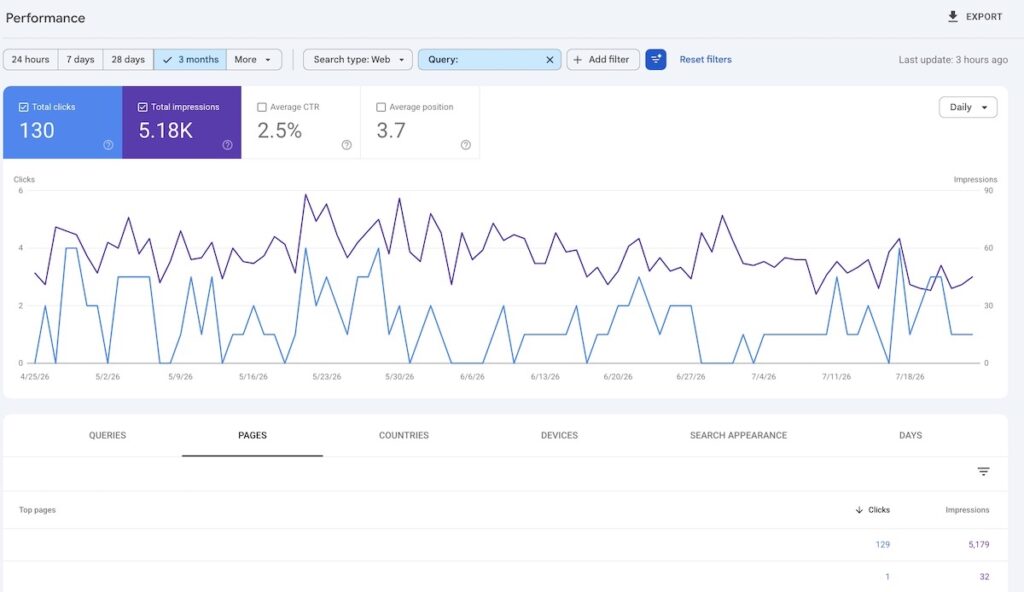
Quick Answer: In Search Console, filter Performance by the exact query, then open the Pages tab. Every URL listed there has ranked for that query in your date range. This is the only source of truth; browser results are personalised and localised.
Do this:
- Search Console → Performance → Search results
- Add a filter: Query → Custom (regex or exact) → your keyword
- Set the date range to the last 3 months, then switch to the Pages tab
- Note every URL that appears, with impressions and average position for each
If two or more URLs appear with meaningful impressions, you have cannibalisation. If only one URL appears and it is not your target page, your target page is either not indexed or not competitive for this query.
Done looks like: a two-column note listing every URL that ranked for the query and its impression share.
Common mistake: checking rankings in an incognito window and concluding the wrong page ranks “everywhere”. Incognito removes personalisation but not location or search history at the datacentre level. Use GSC or a tracker with a fixed location.
Step 2: Check whether Google indexed your dedicated page at all
Quick Answer: Paste your target URL into the GSC URL Inspection tool and compare “User-declared canonical” against “Google-selected canonical”. If they differ, Google folded your page into another URL and it cannot rank until that changes.
The two lines sit at the bottom of the Coverage section in the inspection result. Three outcomes:
- Both match, page is indexed. Canonicalisation is fine. Skip to Step 3.
- They differ. Google merged your page into another URL. Your page is not competing, it is being ignored.
- “Duplicate without user-selected canonical”. You never declared one, so Google chose for you.
When they differ, the cause is nearly always that the two pages are too similar for Google to see a reason to keep both. Templated service pages with a swapped city name are the classic case. So are product variants, paginated archives and near-identical BM and English pages without hreflang.
Done looks like: you can state, in one sentence, whether your target page is indexed under its own URL.
Common mistake: assuming a self-referencing canonical guarantees indexing. It does not. It is a vote, and the rest of your site can outvote it.
Step 3: Split the intent, or accept the merge
Quick Answer: Two pages can only both rank if they answer two genuinely different questions. If you cannot write a one-sentence description of each page that a customer would recognise as different, you do not have two pages, you have one page and a duplicate.
This is the step people skip, and it is the one that actually decides the outcome. Take both URLs and force yourself to complete this:
Page A answers: _____________ Page B answers: _____________
If the answers overlap, pick one. The decision table:
| Situation | Action | Why |
|---|---|---|
| Both pages target the same intent, one has all the links and age | 301 the weaker into the stronger, merge the useful content | Consolidates signals into a single winner |
| Same topic, different funnel stage (guide vs service page) | Keep both, rewrite titles, H1s and openings to separate them | Google can hold both if the intents differ |
| Old post outranks new service page, post has strong backlinks | Keep the post, retarget it to informational intent, link down to the service page | Preserves link equity, redirects intent |
| Duplicate location or variant pages | Consolidate to one page, or add genuinely local content to each | Thin variants get merged automatically anyway |
| Wrong page converts better than the page you built | Leave it alone | Discussed below |
Table 2: Consolidate, differentiate or redirect. Decision framework for competing URLs. Source: Mackyclyde client audit workflow.
Rewriting for separation means the title tag, H1, first 100 words and internal anchors of each page use distinctly different query language. Changing one word in a title is not separation.
Key takeaway: Consolidation beats coexistence for commercial keywords. Two pages splitting one intent both rank worse than one strong page.
Step 4: Rebalance internal anchors toward the page you want
Quick Answer: Crawl your site, export every internal link pointing at both URLs with its anchor text, and make sure the majority of exact-match and near-match anchors point at your target page. This is the highest-leverage change in the entire process and the most commonly skipped.
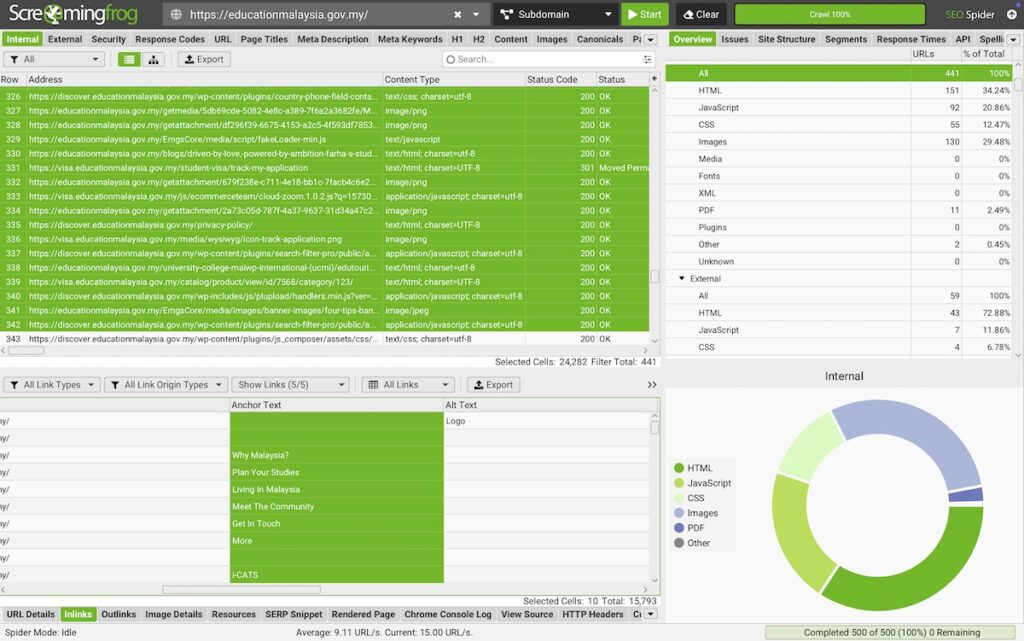
Run Screaming Frog, then export Bulk Export → Links → All Inlinks, filtered to your two URLs. Sort by anchor text. You are looking for the split:
- How many internal links use the target keyword (or a close variant) as anchor?
- Which URL do they point to?
Then flip the majority. Edit the anchors in older posts to point at the target page. Leave the wrong page a few links with descriptive, differentiated anchors (its own topic, not your keyword). Remove nothing.
I have watched this single change swap a ranking URL within one crawl cycle on sites where a canonical tag had been sitting there ignored for months. Anchors are evidence Google can read at scale. A canonical tag is a request.
Done looks like: a spreadsheet showing at least 70% of keyword-bearing internal anchors pointing at the target URL.
Common mistake: adding new links from low-value pages instead of fixing the anchors on the pages that already link. A rewritten anchor on a strong page beats five new links from thin ones.
Step 5: Fix the on-page match on the page you want to rank
Quick Answer: The ranking page usually matches the query more literally than yours does. Compare both pages against the query and close the gap in the title tag, H1, opening paragraph and the first H2, then check that your page type matches the dominant result type in the top 10.
Three checks, in order of impact:
- Title tag. Does the exact query, or its closest natural phrasing, appear near the front? Your target page should match the query more precisely than the competing page does.
- First 100 words. Does the page answer the query in the opening, or does it warm up with company background? Answer-first openings win both the ranking and the AI citation.
- Format. Look at the live SERP. If nine of ten results are comparison articles and your target page is a service page, Google is not confused. It is telling you the query wants a different format. Either build the format the SERP wants, or retarget your page to a query that matches it.
That third check is uncomfortable and it is often the real answer. A dedicated page for a keyword that has informational intent will lose to a blog post forever, including your own blog post.
Key takeaway: Match the format the SERP is already rewarding before you touch anything technical.
Step 6: Force a re-evaluation, then wait properly
Quick Answer: Request indexing for both URLs in GSC, resubmit your sitemap with fresh lastmod dates, and give it 2 to 6 weeks. Both pages must be recrawled and re-evaluated together before the swap holds.
Do all of this in one pass, not spread across weeks:
- Request indexing for the target URL and the competing URL
- Update sitemap lastmod values honestly (only for pages you actually changed)
- Confirm neither page is blocked in robots.txt or carrying a stray noindex
- Set a calendar reminder for 14 days and 30 days to check the Pages tab again
Do not stack another change on top after five days because nothing moved. Sequential changes make the cause of any movement unreadable, and I have seen teams chase their own tails for a quarter this way.
Key takeaway: One change set, one waiting period, one measurement.
Free query-to-page mismatch check. Send us your domain and one keyword where the wrong URL is ranking. We will run the GSC and anchor diagnosis and send back which of the three causes you have, plus the specific pages to edit. No pitch attached. SEO audit service
How to know it is working
Quick Answer: Impressions on the target URL move first, usually within 2 weeks. Position follows. Clicks move last. If impressions on the target URL are flat after 4 weeks, the fix did not take.
| Metric | Where | Typical first movement | What it tells you |
|---|---|---|---|
| Target URL appears in GSC Pages tab for the query | GSC Performance | 1 to 2 weeks | Google is now considering the page |
| Google-selected canonical matches yours | URL Inspection | 1 to 3 weeks after recrawl | Canonical problem resolved |
| Impressions shift from wrong URL to target URL | GSC, compare periods | 2 to 4 weeks | The swap is underway |
| Average position of target URL | Rank tracker | 3 to 6 weeks | Ranking, not just indexing |
| Clicks and conversions | GA4, GSC | 4 to 10 weeks | The change actually paid |
Table 3: Leading and lagging indicators after a wrong-page fix. Source: Mackyclyde practitioner observation.
Troubleshooting: when the wrong page keeps coming back
| Symptom | Likely diagnosis | Fix |
|---|---|---|
| URLs swap positions every few weeks and never settle | No signal majority. Both pages carry roughly equal evidence | Force a decisive split: consolidate one, or rewrite both titles and rebalance anchors past 70% |
| Target page ranks, then drops back after a Google update | The competing page matches intent better and the update sharpened intent matching | Recheck the SERP format. Retarget your page rather than fighting the SERP |
| Canonical tag ignored for months | Pages too similar for Google to keep both | Differentiate the content substantially, or 301 the loser |
| Homepage ranks instead of the service page | Homepage holds most of the domain’s links and brand anchors | Add a prominent internal link from the homepage to the service page with exact anchor, reduce keyword coverage on the homepage |
| Wrong page ranks in Google but AI engines cite a third page | Chunk-level retrieval found a better self-contained passage elsewhere | Rewrite the target page with liftable 40 to 70 word answer blocks under question-phrased H2s |
| Fixed everything, still nothing after 8 weeks | Page may be indexed but has no chance of ranking for a query at that difficulty | Check keyword difficulty honestly. Some queries need links, not tidying |
When you should not fix this
Sometimes the wrong page is the right page.
Check the conversion data before you touch anything. I have talked clients out of this fix more than once, because the “wrong” ranking page was converting at two or three times the rate of the shiny new page built for the keyword. Google chose it for a reason, and that reason was often that visitors preferred it.
Also skip the fix when the mismatch involves a query with negligible volume, when the two URLs serve genuinely different audiences that happen to overlap on one phrase, or when the wrong page ranks for one query and the right page ranks for eight others. Consolidating in that last case usually costs more traffic than it gains.
There is a real cost to admitting this: it means fewer billable fixes. It is still the correct advice.
What this means for AI search
Fixing which page Google ranks usually fixes which page gets cited by AI engines, because retrieval and ranking share signals. Usually is not always.
AI engines assemble answers from passages. If your service page ranks first but your blog post contains the tight, self-contained paragraph that answers the prompt, the blog post gets the citation. Track this separately: run your target prompts in ChatGPT, Perplexity and Google AI Mode and record which of your URLs is cited. Where the cited URL is not the one you want, the fix is passage-level, not site-level. Put the answer block on the page you want cited, phrased so it stands alone without the surrounding page.
We cover the passage structure in detail in our guide to generative engine optimisation.
Conclusion
Do this today: open Search Console, filter Performance by the keyword, and look at the Pages tab. That single view tells you whether you have a canonical problem, a cannibalisation problem or an intent problem, and everything else follows from that answer.
The order that works is diagnose, split intent, rebalance anchors, match the format, then wait. Skipping to the canonical tag is the most common mistake and the least effective lever, because Google treats it as a hint and outvotes it with your own internal links.
If you would rather have someone else run the diagnosis, that is what our technical SEO audits are for. We will map every cannibalisation pair on your site and hand back a prioritised fix list with the anchor edits specified page by page.
Frequently Asked Questions
Why does Google rank my homepage instead of my service page? Your homepage almost certainly holds the largest share of internal links, external backlinks and brand anchors on your domain, so Google reads it as the strongest match for anything the site is broadly about. Fix it by adding a prominent homepage link to the service page using exact keyword anchor text, and by reducing how much that keyword appears on the homepage itself.
Why does Google show two pages from my site for the same query? That is usually host crowding, not an error. Google sometimes shows a second result from the same domain when it judges both relevant, and the second listing is often visually indented. It is not a penalty and it does not need fixing. It becomes a problem only when neither shown URL is the page you want ranking.
Can a canonical tag force Google to rank the page I want? No. Google treats rel="canonical" as one signal among roughly twenty canonicalisation inputs, including internal links, sitemaps, redirects and URL structure. If those disagree with your tag, Google overrides it and reports the conflict as “Duplicate, Google chose different canonical than user” in Search Console. Align the other signals and the tag starts working.
How long does it take for Google to rank the correct page after a fix? Expect 2 to 6 weeks in most cases. Both URLs must be recrawled and re-evaluated before the swap holds, so the timeline depends on your crawl frequency. Impressions on the target URL typically move within 2 weeks, position within 3 to 6, and clicks last. Flat impressions after 4 weeks means the fix did not take.
Should I 301 redirect or noindex the page that is outranking my target? Redirect when both pages serve the same intent and you want one winner: a 301 passes the ranking signals across. Use noindex only when the page must stay live for users but should never rank, such as thin variants or internal search pages. Noindex passes nothing on, so it wastes any links the page has earned.
Is keyword cannibalisation always bad? No. Two pages ranking for the same query is only a problem when they split intent and both underperform, or when the weaker one outranks the page that converts. If the wrong page ranks but converts better, leave it. Check conversion rate per URL before consolidating anything.